Turn your supplier list into an evidence-backed shortlist.
Research supplier websites, review source-linked findings and organise follow-up in one Windows desktop workspace. For buyers who already have supplier lists and spend time checking websites manually.
Product preview. Register your interest using the SANOVA form and describe the sourcing task you would like to try. Support will contact you about access.
A SANOVA product for people handling supplier sourcing and procurement. Decisions stay with you.
ONE PLACE TO KEEP WORK MOVING
From your supplier list to a sourcing workflow.
Start with the supplier list you already have. Use your product catalogue and sourcing criteria to focus research, then move the suppliers you choose into your procurement pipeline.
01
Research your list
Start with supplier email addresses in a TXT or CSV file. The development preview groups them by website domain and inspects public website content against your product profile. Review product phrases, business-model indicators and published location evidence. Support for direct domain and website-URL lists is planned, not available in this development preview.
02
Review the findings
Review saved excerpts and source links, inspect additional internal website pages, flag incorrect product matches and record facts you have verified. A missing product phrase is a research gap, not proof that the supplier cannot supply it.
03
Organise your next action
Track pipeline stages, next actions and due dates. Prepare RFQ materials, record explicit award approval, manage onboarding checks and keep document references together.
Evidence supports your judgement.
Website findings are research aids. Product matches and fit assessments remain separate from your buyer decision. Do not treat an inaccessible website or missing website facts as proof that a supplier is unsuitable. We are reviewing how the development software scores unknown facts before the pilot. Confirm specifications, legal identity, capacity and commercial terms directly before selecting a supplier.
INSIDE THE DESKTOP WORKSPACE
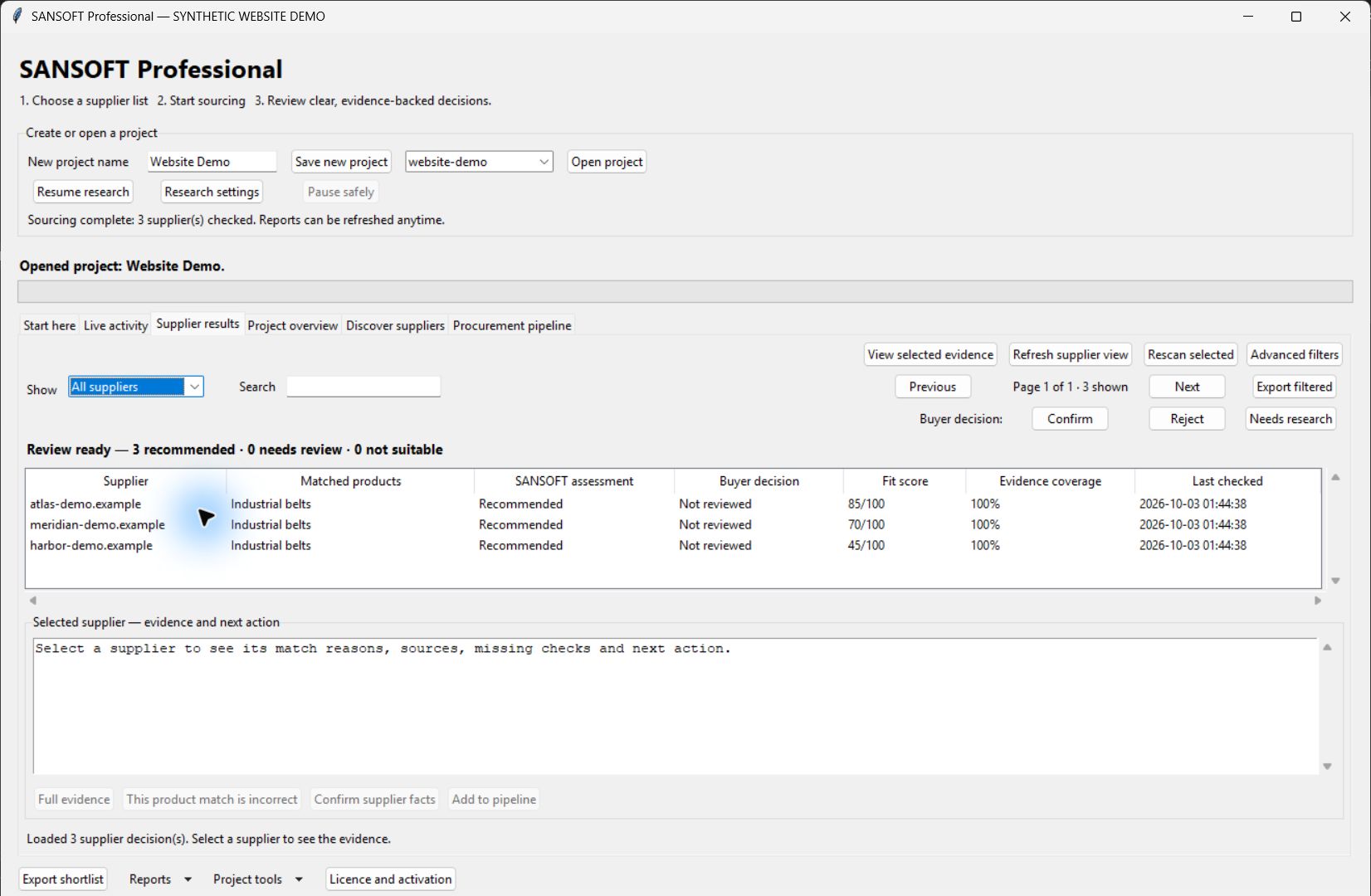
Review the findings. Make your own supplier decision.
Review what the website says, what remains unknown and how it relates to your requirements. Record your own decision separately, then export the appropriate results or shortlist.
SANSOFT / WORKSPACE PREVIEWDevelopment build
View full size ↗Actual development interface with fictional suppliers and synthetic findings. Scores are demonstration values. The current “Evidence coverage” percentage describes scored assessment components, not confidence or positive product evidence; its presentation is being revised before the pilot.
Research your list
Inspect supplied suppliers’ websites.
Review evidence
Read excerpts and source links.
Keep decisions yours
Record your own buyer judgement.
Track the next step
Organise RFQs and follow-up.
Product findings
Matched phrases and source excerpts show what was found on the inspected pages. Confirm exact products and specifications with the supplier.
Requirement fit
The assessment compares recorded findings with your sourcing criteria. It supports review; it does not approve a supplier or guarantee fulfilment.
Missing facts
Unconfirmed information needs follow-up. A percentage is not a probability that a supplier is reliable or suitable.
Inspection status
Completed inspection, waiting work and failed checks describe research progress. They are separate from product fit and your decision.
Development preview. We are refining assessment labels and export descriptions before the pilot. The explanations above describe the intended meaning of the findings, not a claim that every revised label is already implemented.
PROFESSIONAL ACCESS
Planned access options.
The planned quarterly and annual options include the same Professional features and updates to this product while active. Renewal is manual, with no automatic renewal charges. Purchasing remains closed during release validation.
QUARTERLY
$41.90 / 3 months
Professional access for three calendar months.
ANNUAL
$99 / year
Professional access for twelve calendar months.
TRY THE WORKSPACE
7 days / free trial
One project. Up to 100 unique supplier websites. No payment required.
Paid access: one named user, up to two authorised computers used by the same named user. After expiry, viewing, exports and backups remain available; new research and paid editing require active access.
Prices in US dollars. The second authorised computer has no additional licence charge; personally owned and company-issued computers qualify when used by the same named user. Separate future SANOVA products are not included.
At launch, activation is planned as a manually issued code by email after verification. Your access period begins when the licence is issued, and the activation email states the exact expiry. Final delivery hours, holiday handling and checkout terms will be published before purchasing opens.
BEFORE YOU START
A few useful answers.
Is this a desktop app or a web app?
SANSOFT Professional is a Windows desktop application. This website introduces the product; it is not the procurement workspace itself.
Does SANSOFT find suppliers across the whole internet?
The current workspace researches the supplier list you provide and can compare saved supplier records. It is not an unrestricted internet supplier search engine.
Do I need Python or an internet connection?
The Windows package includes its runtime; installing Python separately is not required. Website research needs internet access. Signed-code activation is local, and saved work is stored on your computer.
Does it send RFQs or verify supplier documents?
It prepares RFQ drafts for your review and records follow-up, approval and onboarding checks. It does not automatically send those drafts or verify banking, certifications, legal identity or restricted-party status for you.
Can colleagues share the same licence and projects?
Paid access is planned for one named user on up to two authorised computers. This candidate is a local desktop workspace; shared cloud projects and simultaneous team collaboration are not included.
Do I need different installers for each plan?
No. The same installer supports trial, quarterly and annual access. Activation determines your plan.
What happens when my subscription expires?
You can still view, export and back up existing work. An active trial or subscription is required for new research and paid editing.
Does SANOVA replace the SANSOFT name?
SANOVA is the parent brand. Our flagship remains SANSOFT Professional — Procurement Workspace.
How will I activate SANSOFT?
When public activation opens, send your installation identifier and purchase reference to support@sanovahq.com. After verification, paste the complete code we email into Licence and activation, then click Activate code. No licence attachment is required; file import is optional recovery. Trials also require an issued code.
What happens when I renew or add a computer?
Renewing before expiry preserves remaining paid time; renewing afterward starts the new period when issued. Adding your second authorised computer does not extend expiry. Contact support before a device replacement.
Will it work on a company network?
Website research requires direct internet access. Company proxies are not supported by the development preview; contact support before purchase if your workplace requires one.
Can I activate or purchase today?
Public trial activation and purchases are coming soon. We are completing release validation before making them available. Launch activation will be delivered manually as a code by email after verification.